> ## Documentation Index
> Fetch the complete documentation index at: https://docs.mosaic.so/llms.txt
> Use this file to discover all available pages before exploring further.
# 17. Color Correction
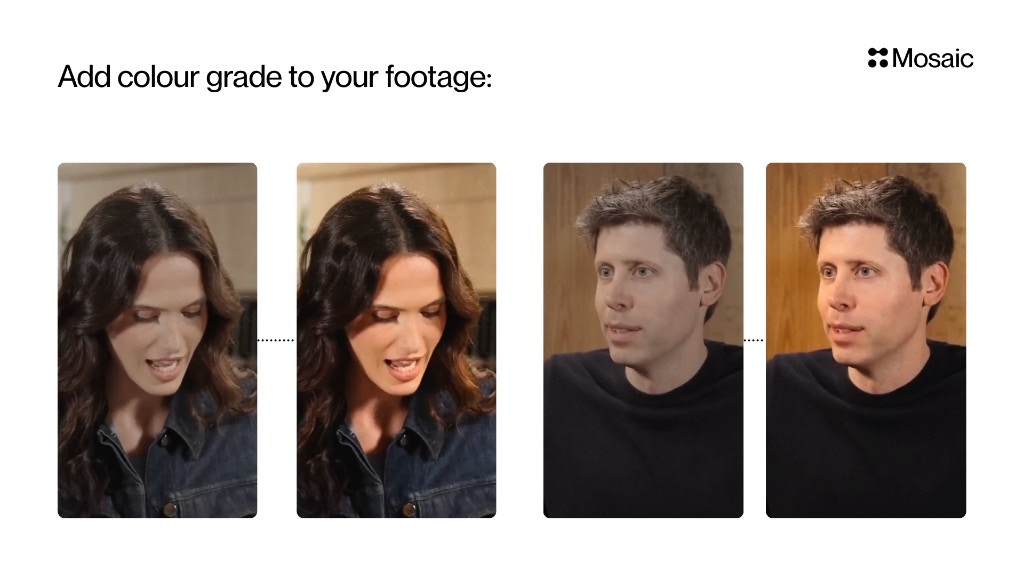
> Apply color grading to your video to improve mood, consistency, or cinematic style.
Apply color grading to your video to improve mood, consistency, or cinematic style. This tile lets you use preset LUTs, custom LUTs, or match the look of a reference image.
## How It Works
Color Correction adjusts the color profile of your footage. You choose one grading method (preset, reference image, or custom LUT), and Mosaic applies that look across your video.
 ## Input & Settings
### 1. Preset LUT
Select a ready-made look such as:
* Golden Hour
* Filmic
* Vibrant
* Cool Tones
* Neutral Clean
**Best for:**\
Fast results when you don't want to think about color science.
### 2. Reference Image
Upload an image whose color style you want to match.
**Example:**\
Upload a still from a movie → Mosaic matches that cinematic look.
**Best for:**\
Brand aesthetics or mood matching.
### 3. Custom LUT (.cube)
Upload your own **.cube LUT** file exported from:
* DaVinci Resolve
* Premiere Pro
* Final Cut
* Photoshop
* Other grading software
**Best for:**\
Colorists or agencies with existing grading pipelines.
***
## API Info
* **Node ID:** `8254e1f8-dfea-42f9-90d8-aa91ec859bec`
### Node params
| Param | Type | Required | Default | Notes |
| --------------------- | --------------------------------------------------- | ----------- | -------------------- | -------------------------------------------------------------------- |
| `mode` | `"reference_image" \| "preset_lut" \| "custom_lut"` | Yes | UI: `"preset_lut"` | Determines which source drives grading. |
| `reference_image_id` | `string` (UUID) | Conditional | unset | Required when `mode="reference_image"`. |
| `preset_lut` | `string` | Conditional | `"golden_hour"` (UI) | Required when `mode="preset_lut"`. |
| `custom_lut_id` | `string` (UUID) | Conditional | unset | Required when `mode="custom_lut"`; references a workspace LUT asset. |
| `custom_lut_filename` | `string` | No | unset | Display/traceability metadata for uploaded LUT. |
| `strength` | `number` | No | `35` | Blend strength. UI slider: 10-40. Runtime accepts 0-40. |
### Parameter groups
* **Mode selector:** `mode`
* **Reference-image mode:** `reference_image_id`, `strength`
* **Preset LUT mode:** `preset_lut`
* **Custom LUT mode:** `custom_lut_id`, `custom_lut_filename`
### Supported `preset_lut` values
* `warm_amber`
* `sunset_boulevard`
* `royal_blue`
* `retro_forest`
* `peach_melba`
* `pastel_mint`
* `lavender_dust`
* `golden_hour`
* `butter_cream`
* `blueberry_dream`
### Scenario requirements
* `mode="reference_image"` -> `reference_image_id` required.
* `mode="preset_lut"` -> `preset_lut` required.
* `mode="custom_lut"` -> `custom_lut_id` required (workspace LUT asset ID).
### Runtime notes
* UI persists only one active grading source; changing `mode` clears conflicting fields.
### Example
```json theme={null}
{
"mode": "preset_lut",
"preset_lut": "golden_hour",
"strength": 35
}
```
## Input & Settings
### 1. Preset LUT
Select a ready-made look such as:
* Golden Hour
* Filmic
* Vibrant
* Cool Tones
* Neutral Clean
**Best for:**\
Fast results when you don't want to think about color science.
### 2. Reference Image
Upload an image whose color style you want to match.
**Example:**\
Upload a still from a movie → Mosaic matches that cinematic look.
**Best for:**\
Brand aesthetics or mood matching.
### 3. Custom LUT (.cube)
Upload your own **.cube LUT** file exported from:
* DaVinci Resolve
* Premiere Pro
* Final Cut
* Photoshop
* Other grading software
**Best for:**\
Colorists or agencies with existing grading pipelines.
***
## API Info
* **Node ID:** `8254e1f8-dfea-42f9-90d8-aa91ec859bec`
### Node params
| Param | Type | Required | Default | Notes |
| --------------------- | --------------------------------------------------- | ----------- | -------------------- | -------------------------------------------------------------------- |
| `mode` | `"reference_image" \| "preset_lut" \| "custom_lut"` | Yes | UI: `"preset_lut"` | Determines which source drives grading. |
| `reference_image_id` | `string` (UUID) | Conditional | unset | Required when `mode="reference_image"`. |
| `preset_lut` | `string` | Conditional | `"golden_hour"` (UI) | Required when `mode="preset_lut"`. |
| `custom_lut_id` | `string` (UUID) | Conditional | unset | Required when `mode="custom_lut"`; references a workspace LUT asset. |
| `custom_lut_filename` | `string` | No | unset | Display/traceability metadata for uploaded LUT. |
| `strength` | `number` | No | `35` | Blend strength. UI slider: 10-40. Runtime accepts 0-40. |
### Parameter groups
* **Mode selector:** `mode`
* **Reference-image mode:** `reference_image_id`, `strength`
* **Preset LUT mode:** `preset_lut`
* **Custom LUT mode:** `custom_lut_id`, `custom_lut_filename`
### Supported `preset_lut` values
* `warm_amber`
* `sunset_boulevard`
* `royal_blue`
* `retro_forest`
* `peach_melba`
* `pastel_mint`
* `lavender_dust`
* `golden_hour`
* `butter_cream`
* `blueberry_dream`
### Scenario requirements
* `mode="reference_image"` -> `reference_image_id` required.
* `mode="preset_lut"` -> `preset_lut` required.
* `mode="custom_lut"` -> `custom_lut_id` required (workspace LUT asset ID).
### Runtime notes
* UI persists only one active grading source; changing `mode` clears conflicting fields.
### Example
```json theme={null}
{
"mode": "preset_lut",
"preset_lut": "golden_hour",
"strength": 35
}
```