> ## Documentation Index
> Fetch the complete documentation index at: https://docs.mosaic.so/llms.txt
> Use this file to discover all available pages before exploring further.
# 23. Destination
> Export, schedule, or publish your video directly to social platforms from Mosaic.
The Destination tile lets you export, schedule, or publish your video directly to social platforms from Mosaic — no need to download and re-upload manually.
## How It Works
Add the Destination tile at the end of your workflow. When it runs, Mosaic formats your video for the target platform(s), optionally generates social captions, and publishes or exports.
 ## Input & Options
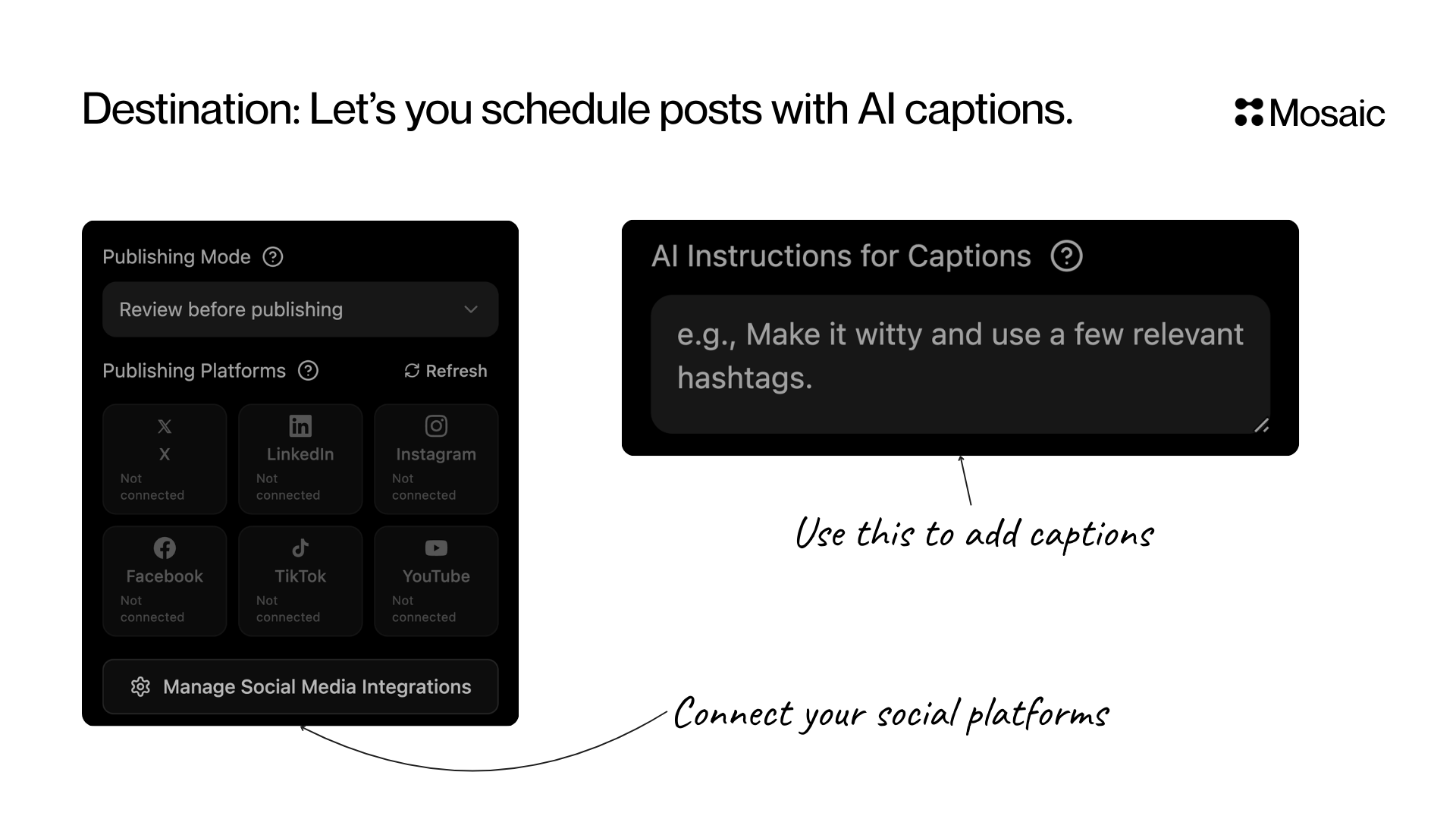
### Publishing Mode
| Mode | What it does |
| ---------------------------- | ------------------------------------------------- |
| **Review before publishing** | Preview and approve posts before they go live |
| **Publish immediately** | Posts go out as soon as they're ready |
| **Export only** | Skip platform publishing — just download the file |
### Publishing Platforms
Connect and publish to:
* X (Twitter)
* LinkedIn
* Instagram
* Facebook
* TikTok
* YouTube
Click **Manage Social Media Integrations** to connect, disconnect, or refresh your accounts. You only need to do this once per account.
### AI Captions for Posts (Optional)
Tell the AI how to write your social media post text.
Examples:
* "Make it witty and add relevant hashtags"
* "Write for LinkedIn with a strong hook and CTA"
* "Write for TikTok using casual language and emojis"
Leave empty for a neutral auto-generated caption.
Destination works best at the end of a workflow chain like: [Clips](/tiles/clips) → [Reframe](/tiles/reframe) → [Captions](/tiles/captions) → **Destination**
***
## API Info
* **Node ID:** `e840b66c-488c-4247-9e46-756b914fc287`
### Node params
| Param | Type | Required | Default | Notes |
| ----------------- | ----------------------------------------------------------------------------- | -------- | ---------- | ------------------------------------------------ |
| `platforms` | `("x" \| "linkedin" \| "instagram" \| "facebook" \| "tiktok" \| "youtube")[]` | Yes | `[]` | At least one platform required. |
| `approval_mode` | `"manual" \| "auto"` | No | `"manual"` | Manual review queue vs immediate publishing. |
| `ai_instructions` | `string` | No | `""` | Prompt for social caption generation style/tone. |
### Parameter groups
* **Destination routing (required):** `platforms`
* **Publish policy:** `approval_mode`
* **Caption generation guidance:** `ai_instructions`
### Scenario requirements
* `platforms` must be non-empty.
### Runtime notes
* Backend resolves caption instruction text from multiple keys (`ai_instructions`, `ai_prompt`, `instructions`, `prompt`) for backward compatibility.
* Only connected social accounts are selectable in UI, but API clients can still submit valid platform IDs directly.
### Example
```json theme={null}
{
"platforms": ["linkedin", "youtube"],
"approval_mode": "manual",
"ai_instructions": "Write concise posts with a hook and one CTA."
}
```
## Input & Options
### Publishing Mode
| Mode | What it does |
| ---------------------------- | ------------------------------------------------- |
| **Review before publishing** | Preview and approve posts before they go live |
| **Publish immediately** | Posts go out as soon as they're ready |
| **Export only** | Skip platform publishing — just download the file |
### Publishing Platforms
Connect and publish to:
* X (Twitter)
* LinkedIn
* Instagram
* Facebook
* TikTok
* YouTube
Click **Manage Social Media Integrations** to connect, disconnect, or refresh your accounts. You only need to do this once per account.
### AI Captions for Posts (Optional)
Tell the AI how to write your social media post text.
Examples:
* "Make it witty and add relevant hashtags"
* "Write for LinkedIn with a strong hook and CTA"
* "Write for TikTok using casual language and emojis"
Leave empty for a neutral auto-generated caption.
Destination works best at the end of a workflow chain like: [Clips](/tiles/clips) → [Reframe](/tiles/reframe) → [Captions](/tiles/captions) → **Destination**
***
## API Info
* **Node ID:** `e840b66c-488c-4247-9e46-756b914fc287`
### Node params
| Param | Type | Required | Default | Notes |
| ----------------- | ----------------------------------------------------------------------------- | -------- | ---------- | ------------------------------------------------ |
| `platforms` | `("x" \| "linkedin" \| "instagram" \| "facebook" \| "tiktok" \| "youtube")[]` | Yes | `[]` | At least one platform required. |
| `approval_mode` | `"manual" \| "auto"` | No | `"manual"` | Manual review queue vs immediate publishing. |
| `ai_instructions` | `string` | No | `""` | Prompt for social caption generation style/tone. |
### Parameter groups
* **Destination routing (required):** `platforms`
* **Publish policy:** `approval_mode`
* **Caption generation guidance:** `ai_instructions`
### Scenario requirements
* `platforms` must be non-empty.
### Runtime notes
* Backend resolves caption instruction text from multiple keys (`ai_instructions`, `ai_prompt`, `instructions`, `prompt`) for backward compatibility.
* Only connected social accounts are selectable in UI, but API clients can still submit valid platform IDs directly.
### Example
```json theme={null}
{
"platforms": ["linkedin", "youtube"],
"approval_mode": "manual",
"ai_instructions": "Write concise posts with a hook and one CTA."
}
```